
Lowering your server’s view-distance and simulation-distance can greatly improve performance (TPS) by loading and ticking fewer chunks. This guide shows where to change these settings for Vanilla/Paper/Spigot and how to pick good values.
What These Settings Do
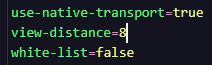
- view-distance — How many chunk rings are sent to players (what they can see). Affects bandwidth and memory.
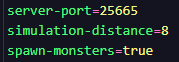
- simulation-distance — How many chunk rings are actively ticked (mobs AI, redstone, farms). Affects CPU the most.
Tip: Reducing simulation-distance usually gives the biggest lag reduction on survival servers with farms.
Before You Start
- Back up your server (optional but recommended).
- Tell players you’re adjusting performance settings; it may change how far they can see or how farms behave at range.
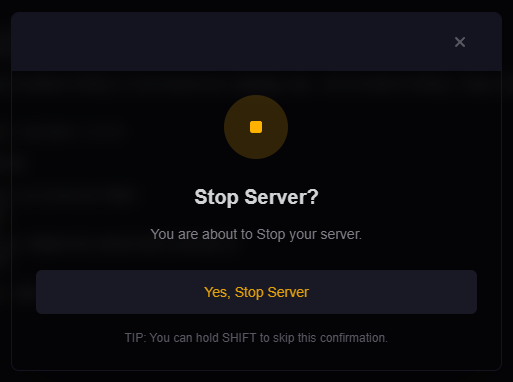
Step 1: Stop Your Server
- Log in to the HostByte Game Panel.
- Open your Java server and click Stop until it shows Offline.
Step 2: Edit server.properties (All Java Servers)
- Go to File Manager → open
server.properties. - Find or add the lines and set your values, for example:
view-distance=8 simulation-distance=6 - Click Save.
Notes:
• simulation-distance exists on modern versions. If missing on older versions, only view-distance is available.
• Lower numbers = fewer chunks = better performance, but players see/tick less.
Step 3 (Optional): Paper/Spigot Per-World Settings
Paper and Spigot let you fine-tune or override per world.
Paper
- Defaults file:
paper-world-defaults.yml(global defaults) - Per-world file:
world/paper-world.yml(and for Nether/End)
Look for keys like view-distance and simulation-distance in those files to override the server.properties values per world.
Spigot (Legacy/Older)
- File:
spigot.yml→world-settings→defaultor the specific world
Older Spigot versions exposed view-distance per-world here. On newer versions, prefer server.properties and your platform’s docs.
Step 4: Start & Test
- Return to the dashboard and click Start.
- Join the server and confirm chunks load as expected.
- Monitor TPS with timings or a profiler plugin (e.g., spark).
Recommended Starting Values
- Small servers / survival SMP:
view-distance=8,simulation-distance=6 - Mid-size / events:
view-distance=10,simulation-distance=8 - Performance under load: try
6 / 4, then raise gradually
Increase slowly and observe TPS. Values below 4 simulation may affect some farm mechanics at range.
Common Issues & Fixes
“No change after restart”
- Ensure you edited the correct
server.propertiesfor this server. - Paper/Spigot per-world files can override. Check
paper-world*.ymlorspigot.yml.
Players complain they can’t see as far
- Raise
view-distancea little; keepsimulation-distanceconservative for TPS.
Farms stop when players move away
- Increase
simulation-distancemodestly or keep players closer to the farms.
Best Practices
- Change one value at a time and test during peak hours.
- Favor lowering
simulation-distancefirst for CPU relief. - Document your final settings for staff and future updates.
Getting Help
- Knowledge Base: See related Java guides (slots, difficulty, performance tuning).
- Support Ticket: Log in to your HostByte account to open a ticket.
- Discord: Join our community:
- Status Page: Check maintenance/outages: status.hostbyte.net.