
Plugins add features like homes, warps, shops, ranks, and protection to your Minecraft Java server. You can install them with the Plugin Manager (one-click) or manual upload using the HostByte Game Panel.
Before You Start
- Platform check: Plugins work on Spigot/Paper. They do not work on Fabric or Forge (those use mods).
- Java version: Many modern plugins require Java 17+.
- Back up: Create a backup before adding or updating plugins.
Method A — Install via Plugin Manager (One-Click)
- Log in to the HostByte Game Panel and open your server.
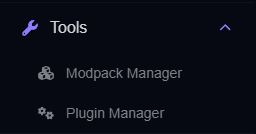
- In the left sidebar, go to Tools → Plugin Manager.
- Use the Search bar to find a plugin. Click the plugin to view details (supported MC versions, dependencies).
- Click Install. The panel downloads the
.jarinto/plugins. - Go back to the dashboard and click Restart to load the plugin.
Updating or Removing (Plugin Manager)
- Update: Open Plugin Manager, find the plugin, click Update, then Restart.
- Remove: Click Uninstall (or delete the
.jar). Optionally delete its data folder in/plugins/PluginName/, then Restart.
Method B — Manual Install (File Manager or SFTP)
Step 1: Download the Plugin (.jar)
- Download from a trusted source. If you get a .zip, unzip locally and keep the plugin .jar.
- Check the plugin page for supported MC versions and dependencies (e.g., Vault, ProtocolLib, PlaceholderAPI).
Step 2: Upload to /plugins
Option A — File Manager:
- Open File Manager → /plugins → Upload your
.jar.

Option B — SFTP (best for many/large files):
- Copy your SFTP Details from the panel, connect with FileZilla/WinSCP, and upload the
.jarinto/plugins.

How to use SFTP: https://www.hostbyte.net/billing/knowledgebase/72/How-to-Connect-via-SFTP.html
Step 3: Restart & Verify
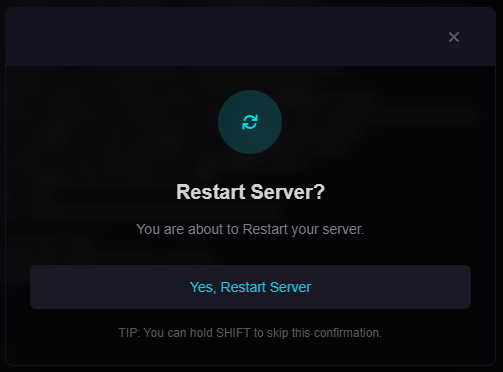
- Click Restart on the server dashboard.
- Open Console to ensure the plugin enabled without errors.
- In-game (as OP), run
/plugins; the plugin should appear in the list.
Configure a Plugin (Example: EssentialsX)
- After first load, EssentialsX creates
/plugins/Essentials/withconfig.yml(andkits.yml). - Edit configs via File Manager/SFTP, then Restart to apply.
Common tasks (as OP)
/sethome [name]
/home [name]
/spawn
/setspawn
/warp <name>
/setwarp <name>
/tpa <player>
/tpaccept
Permissions
Grant nodes with your permissions plugin (e.g., LuckPerms), or test as OP:
essentials.home
essentials.sethome
essentials.spawn
essentials.warp
essentials.kit
essentials.tpa
essentials.tpaccept
Common Issues & Fixes
“Unknown dependency” / “Missing dependency”
- Install required dependencies (e.g., Vault, ProtocolLib, PlaceholderAPI) and restart.
“Unsupported API version” / Wrong server version
- Use the build that matches your MC version and Spigot/Paper API.
Plugin doesn’t load; no errors
- Ensure it’s a
.jardirectly inside/plugins(not nested/zip). - Remove duplicate versions of the same plugin.
Commands not found / no permission
- Check command syntax and permission nodes; grant via your permissions plugin or test as OP.
⚠️ Note: Some plugins aren’t listed in Plugin Manager or require specific builds. Use the manual method for those.
Best Practices
- Add one plugin at a time and test so you can trace issues.
- Avoid hot-reload; prefer restarts to prevent memory/duplicate issues.
- Keep a changelog of installed/updated plugins and versions.
Getting Help
- Knowledge Base: See related Java guides (EssentialsX, permissions, backups).
- Support Ticket: Log in to your HostByte account to open a ticket.
- Discord: Join our community:
- Status Page: Check maintenance/outages: status.hostbyte.net.